Latest release Self-hosted model and dataset hub
A self-hosted home for your arsenal of models.
Hangar is a Hugging Face Hub-compatible server for your machine learning models and datasets. Pull from huggingface.co once, keep full version history on your own storage, and serve it to the tools you already use.
Free to self-host. Source-available under the Elastic License 2.0.
# Point any Hugging Face client at Hangar
$ export HF_ENDPOINT=https://hangar.example.com
$ hf download Qwen/Qwen3-0.6B

# Or pull one quant straight into Ollama
$ ollama pull hangar.example.com/unsloth/Qwen3-0.6B-GGUF:Q4_K_M

# Or clone a Repo, LFS files and all
$ git clone https://hangar.example.com/Qwen/Qwen3-0.6B- huggingface_hub
- transformers
- datasets
- git
- Ollama
- LM Studio
- vLLM
- DuckDB
Why Hangar
Model files are big, and everyone needs them
-
Every machine downloads the same gigabytes
Laptops, CI runners and GPU nodes each fetch the same weights from huggingface.co. With Hangar you pull a model once, and every client loads it from your own network.
-
Upstream is out of your hands
Repos get deleted, gated or rewritten. A Mirror keeps the Commits you pulled, so pinned Revisions keep working.
-
Every tool fetches its own copy
Hugging Face libraries, Ollama and LM Studio each download from the internet separately. Hangar gives them one source on your network.
-
Some networks can't reach the internet at all
An air-gapped Instance pulls from another Hangar that can.
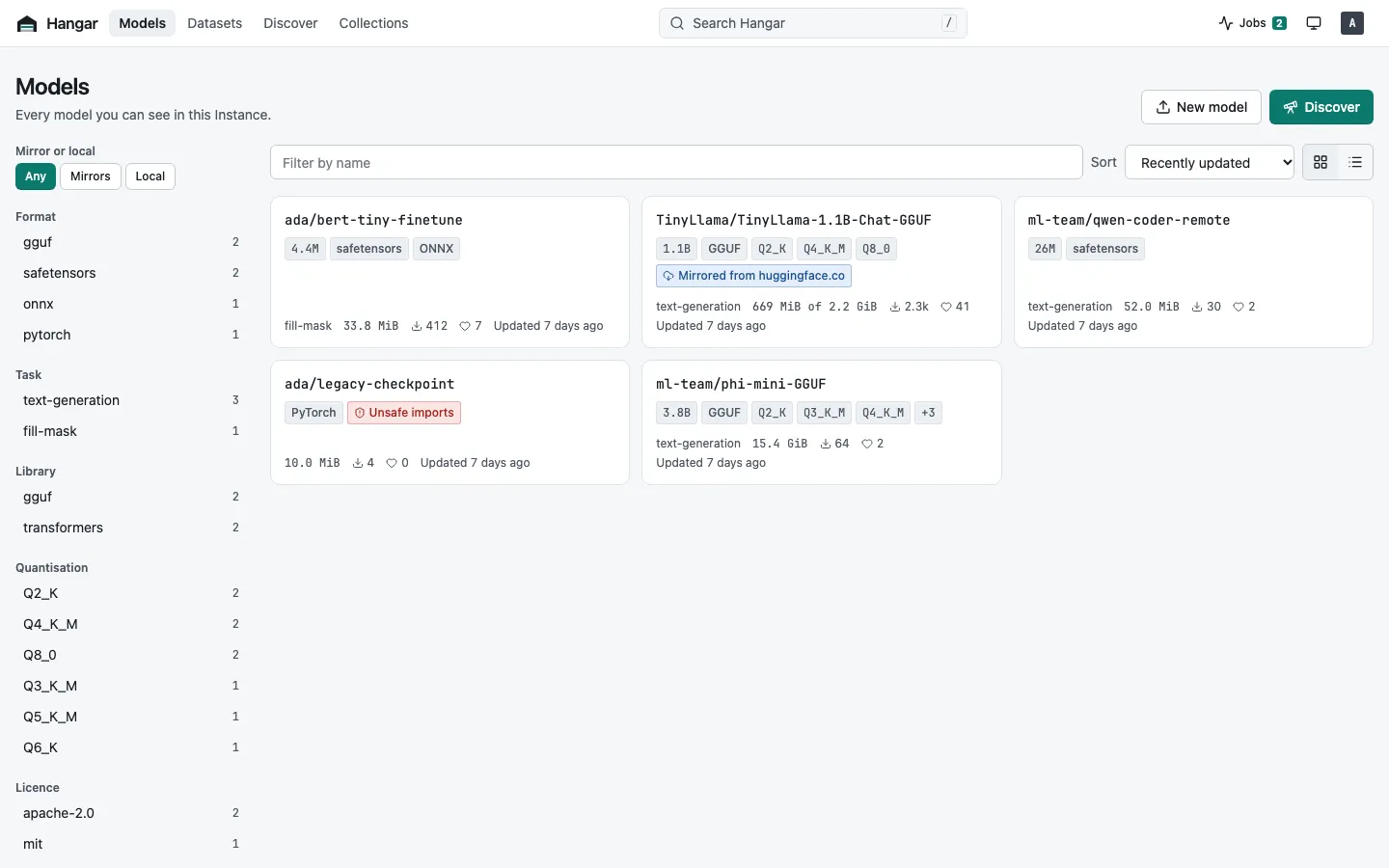
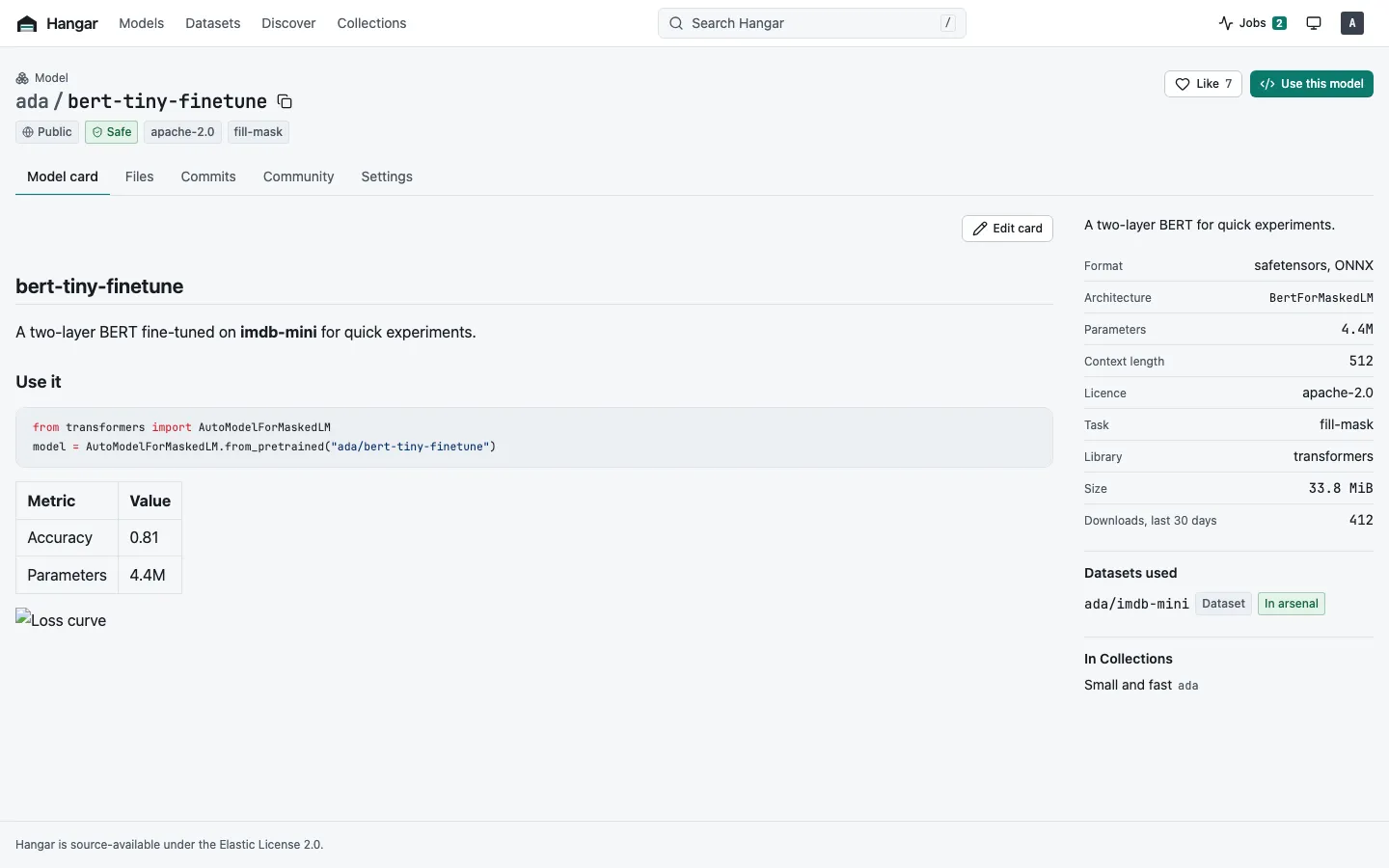
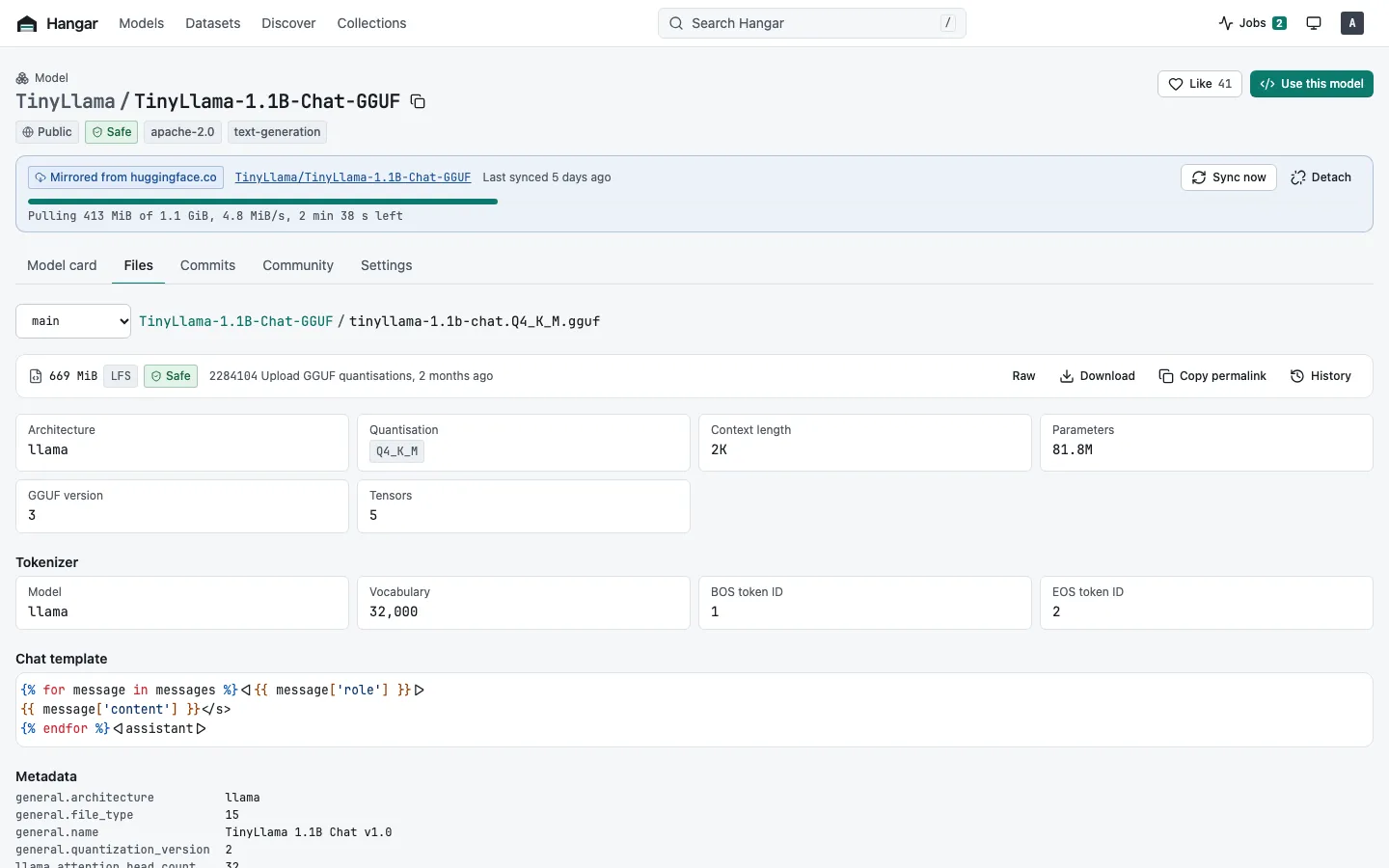
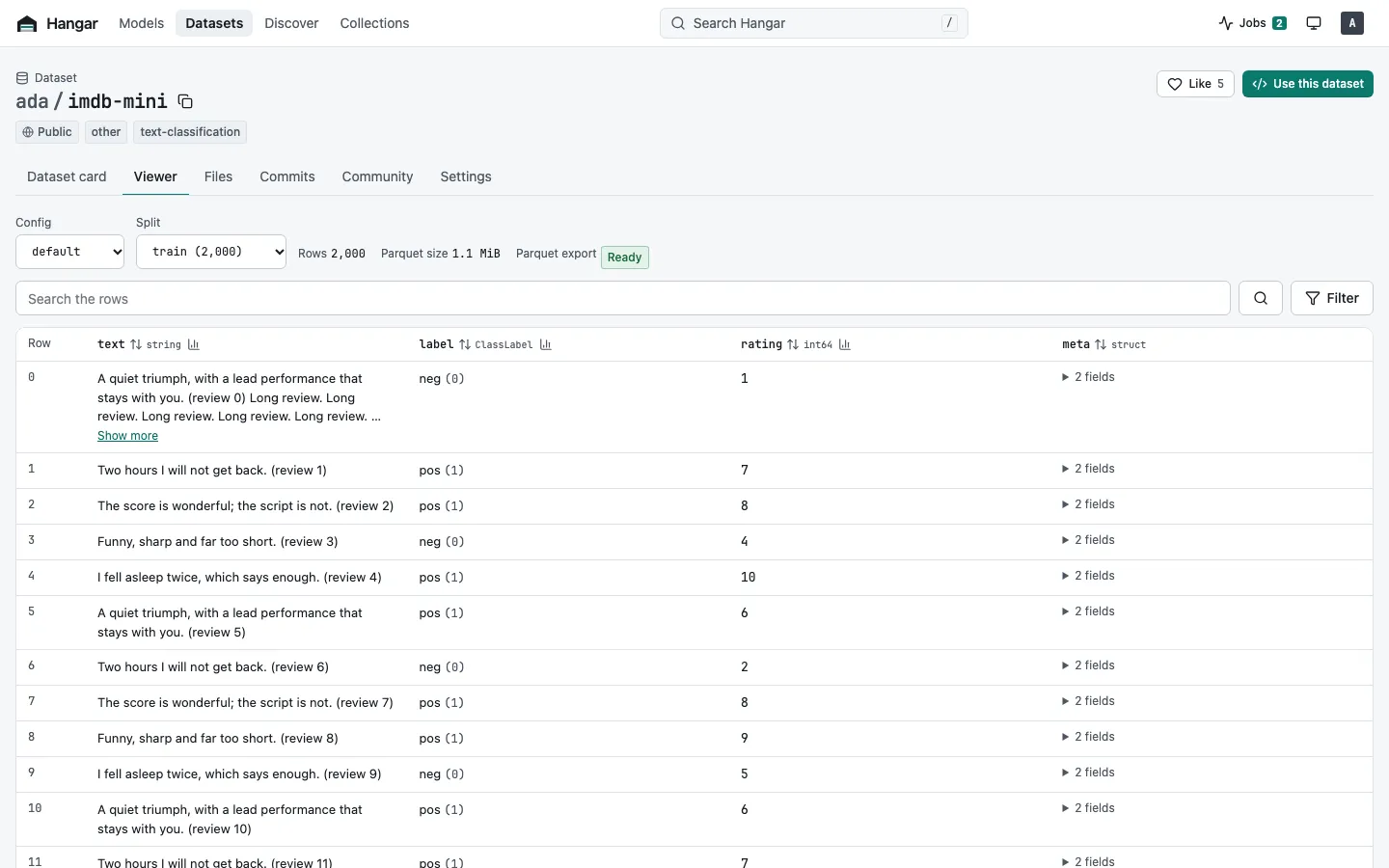
The web UI
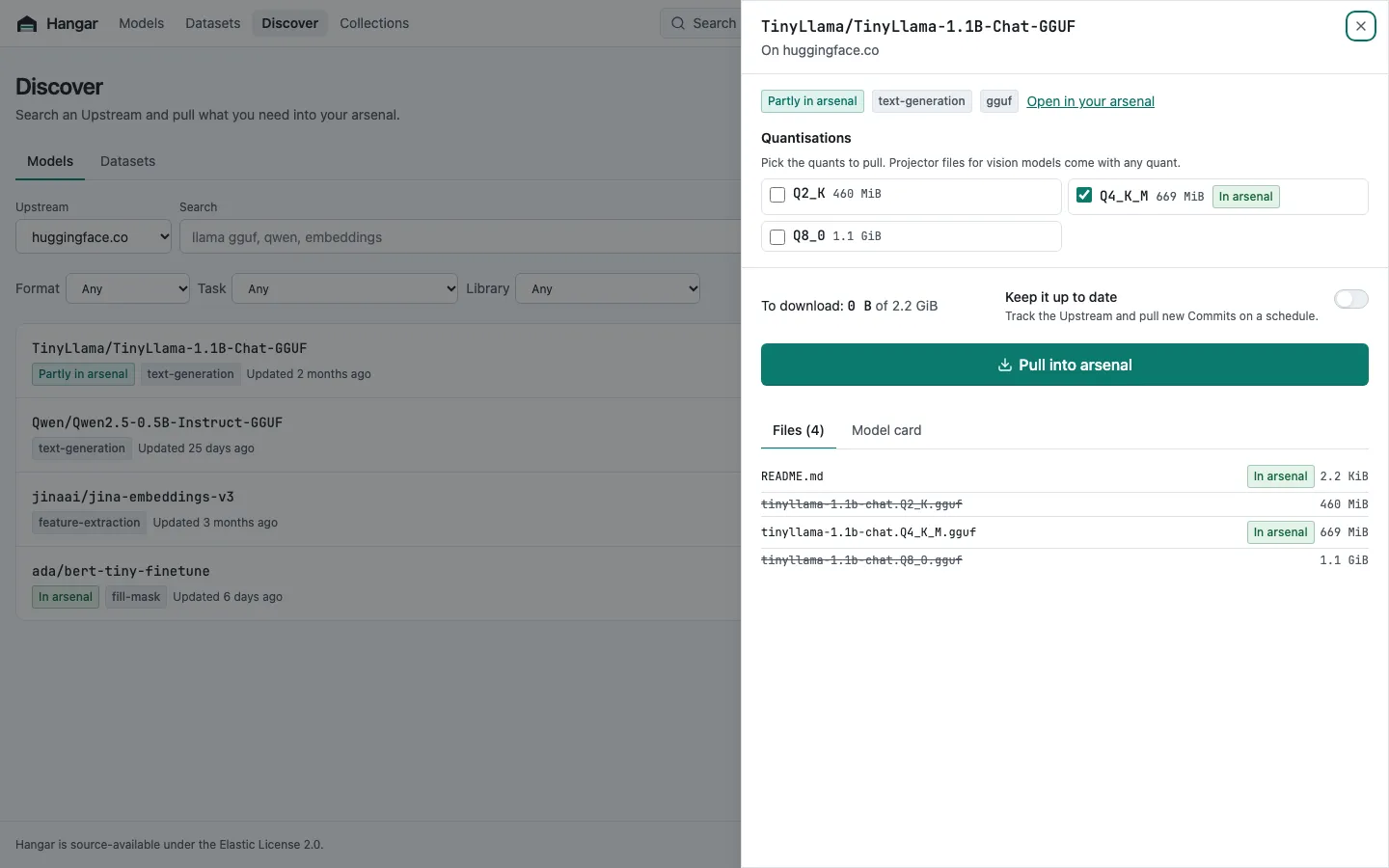
Browse everything you have, and everything you could pull
Model cards, files, GGUF metadata and dataset rows, with filters for format, task, quantisation and size. Search huggingface.co from the same place, with what is already in your Arsenal marked.
Compatibility
Works with the tools you already use
Compatibility with the Hugging Face Hub API is the product. Hangar speaks the same API, so your code, scripts and pipelines keep working.
Hugging Face libraries
Set HF_ENDPOINT and huggingface_hub, the hf CLI, transformers,
diffusers, sentence-transformers, datasets and vLLM work unchanged.
export HF_ENDPOINT=https://hangar.example.com
Python guide
git and git-lfs
Every Repo is a git repository. Clone it, push to it, and keep large files in LFS.
git clone https://hangar.example.com/acme/my-model.git
git guide
Ollama
Pull any GGUF Repo into Ollama by quantisation, straight from your Instance.
ollama pull hangar.example.com/org/model:Q4_K_M
Ollama guide
LM Studio
Install a GGUF quantisation into LM Studio with one command from the hangar CLI.
hangar lmstudio install org/model:Q4_K_M
LM Studio guide
Datasets
load_dataset, pandas and Polars over hf://, DuckDB over HTTPS, and a
Dataset Viewer to preview, search, filter and profile rows.
load_dataset("acme/reviews")
Datasets guide
Your own models
Upload models that exist nowhere else, from the browser, the hf CLI, git or huggingface_hub. Xet uploads work with no setup.
hf upload acme/my-model ./weights
Uploading guide
How it works
Pull once. Load from your own storage as often as you like.
-
Discover
Search huggingface.co, or another Hangar Instance, from the web UI or the hangar CLI. What is already in your Arsenal is marked.
-
Pull
Fetch a whole Repo, or only the quantisation, Config or Split you want, with any code it depends on. Pulls run as background Jobs, inside pull windows if your bandwidth needs them.
-
Serve
A Mirror keeps the upstream Repo ID and Commit SHAs, so pinned Revisions keep working. Clients load from fast local storage, even on an air-gapped network.
Operate
From a laptop to a cluster
Start with one container and grow into a highly available deployment without changing how clients connect.
Start small
1 container · SQLite · a local folder
Run Hangar on a laptop, a homelab or a single VM with Docker, Docker Compose or one binary for Linux, macOS or Windows.
Scale out
Replicas · Postgres · S3-compatible storage
Run stateless replicas with separate web and worker processes, installed with the Helm chart. See Scaling.
-
Sign in with your identity provider
Local accounts and OIDC, with guides for Keycloak, Authentik, Microsoft Entra ID, Google, Okta and GitLab.
-
Organisations, Roles and Tokens
Share Repos with read, write and admin Roles, and give each client a scoped Token with an optional expiry.
-
Security scans
Every Commit is scanned for pickle files that run code when loaded, and you choose what to block.
-
OpenTelemetry built in
Traces, metrics and logs, with ready-made Grafana and Kibana dashboards.
-
Webhooks and Collections
React to pushes and Pulls with webhooks, and curate ordered Collections of Repos for your team.
-
Import what you already have
Bring an existing Hugging Face cache into Hangar, and back up and restore an Instance when you need to.
Quickstart
Start with one command
Run the container, then sign in. Compose, Helm and binary installs are in Get started.
docker run -d --name hangar -p 8080:8080 -v hangar:/var/lib/hangar \
  -e HANGAR_SERVER_PUBLIC_URL=http://localhost:8080 \
  ghcr.io/hangar-hub/hangar:latest
docker logs hangarQuestions
Frequently asked questions
Is Hangar a cache for Hugging Face models?
It does more than cache. Each Pull keeps a Mirror of the Repo with its git history and the upstream Commit SHAs, and you can upload models that exist nowhere else. Clients load everything from your own storage.
Does Hangar run models?
No. Hangar stores and serves files. Run models with the tools you already use, such as transformers, vLLM, Ollama or LM Studio, and point them at Hangar for the weights. Spaces and the Inference API are out of scope.
Do I need to change my code?
No. Set HF_ENDPOINT to your Instance and HF_TOKEN to a Token you create in Hangar. huggingface_hub, the hf CLI, transformers, diffusers, sentence-transformers, datasets and vLLM then work unchanged.
Can Hangar run without internet access?
Yes. An air-gapped Instance can pull from another Hangar Instance that has internet access, as its Upstream. You can also import an existing Hugging Face cache.
Does it work with hf_xet?
Yes for uploads. Hangar accepts Xet uploads, so huggingface_hub with hf_xet installed works with no setup. It stores whole files and serves them over plain HTTP.
What does it cost?
Nothing. Hangar is source-available under the Elastic License 2.0. You can use, change and self-host it, including inside your company. You can't offer it to others as a hosted or managed service, or remove licence notices.
Give your models a home
Install Hangar in a few minutes, or look around the demo first.